
How the Instagram Growth Agent Works — and What to Do First
Most Instagram advice tells you what good accounts do. The Instagram Growth Agent looks at your account and shows you what to fix. It works right on a live, pixel-faithful mockup of your own profile: paste your handle, and the agent rebuilds your page inside a phone frame, audits it like a strategist, and pins its findings right where the problems are.
This guide walks through a full session: what the agent does with your audit, how one idea becomes a week of posts, and where the deeper tools live.
What it is, in one paragraph
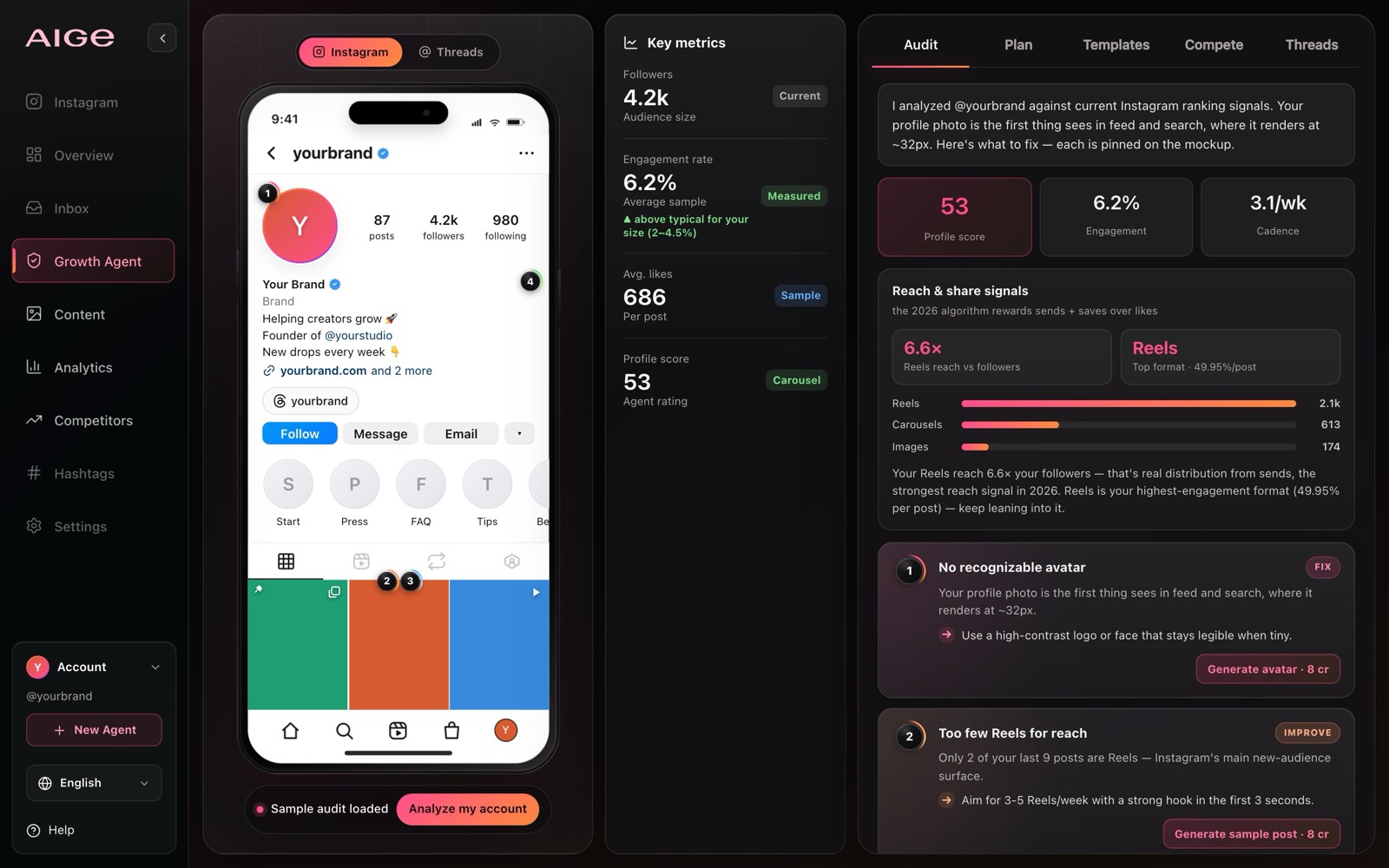
The Growth Agent is a focused workspace at aige.ws/instagram-agent. On the left, a phone shows your reconstructed profile. On the right sit six tabs: Audit (score, findings, and a chat that remembers your account), Ideas (turn a rough thought into a content brief), Plan (a dated posting calendar), Templates, Compete, and Threads. Everything it recommends, it can also help produce: rewritten bios you apply in one tap, AI-generated avatars and posts, captions in your tone of voice.
Step 0: You don't have to do anything
Open the page for the first time, or signed out, and a sample audit is already loaded, computed locally with no backend call, so you can poke at every feature before connecting anything real. Tap the pins, switch tabs, drag the grid around. Signed in with an account you've analyzed before? The agent resumes it instead. When you're ready for the real thing, hit Analyze my account.
Step 1: Paste your link — and tell it who you're for
The form asks for three things:
Your profile link or @handle. Public accounts are reconstructed automatically.
Your brand or niche. One line is enough: "handmade ceramics studio" beats "business".
Your target audience. This is the one people skip, and it's the one that changes everything: the agent judges your bio, grid and captions against the audience you want, not against a generic checklist.
Private or unfetchable account? You can enter your details manually: followers, bio, category, and the agent audits from that instead.
Step 2: Read your audit
A few seconds later you get a 0–100 profile score and a set of numbered pins placed directly on your mockup: one on the bio that buries its call to action, one on the avatar that disappears at thumbnail size, one on the grid row that breaks your visual rhythm. Each finding says what's wrong, why it matters for your audience, and what to do about it.
The score isn't a vanity number. It moves when you fix things, so it doubles as your progress bar. Re-audit the account later and the panel shows what got fixed, what's new, and what's still open.
Step 3: Apply fixes without leaving the page
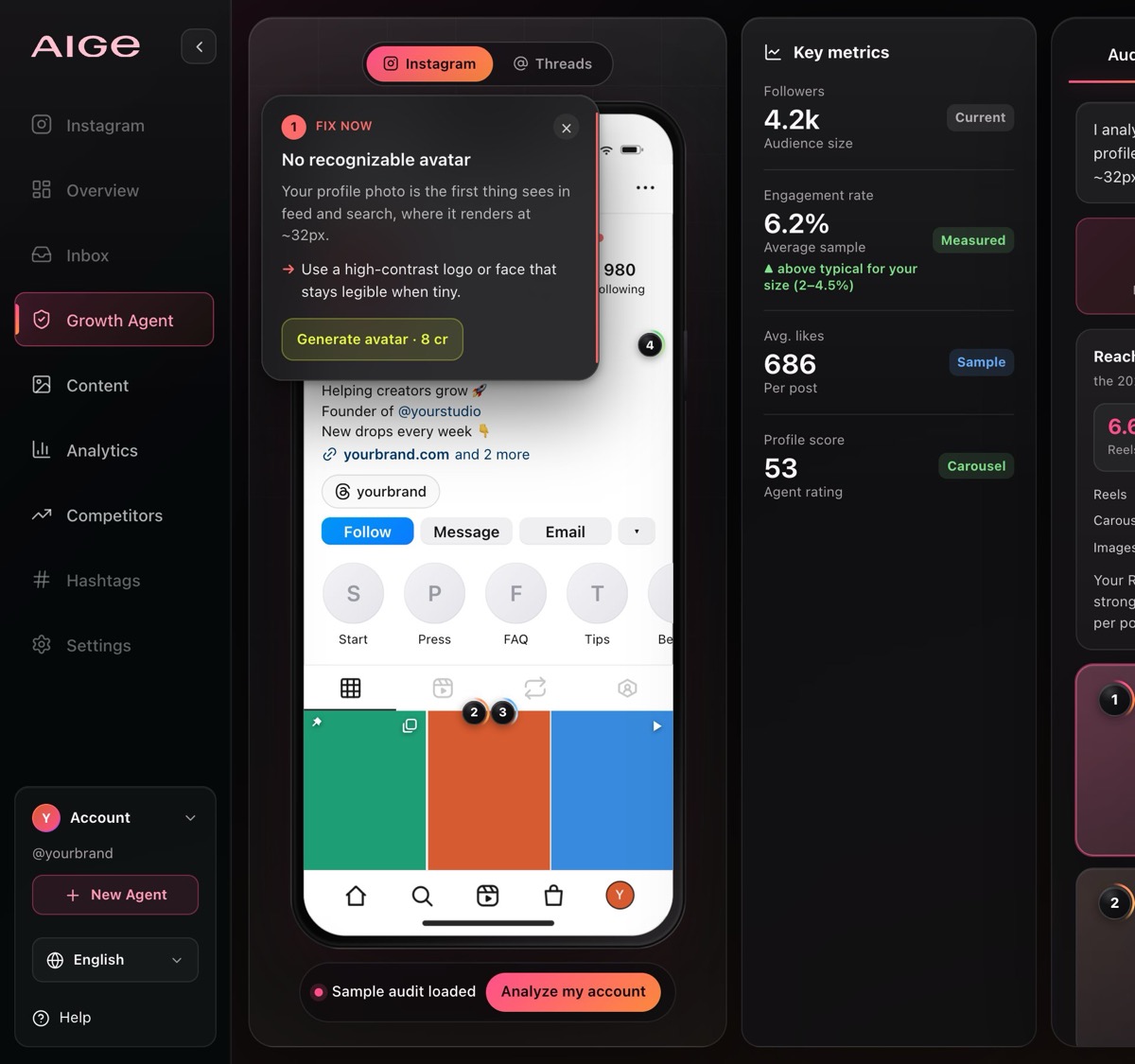
Tap a pin and the recommendation opens next to it:
Bio rewrites apply in one tap, and the mockup updates instantly.
Avatars and posts can be generated on the spot. Image generation uses AIGE credits, and the agent tells you the cost before it spends anything.
The grid is draggable, so you can reorder posts to test a stronger opening row.
Hold "before" to flip back to your original profile and see the difference side by side.
New to generating images on AIGE? This guide covers the basics.
Step 4: Turn the audit into a plan
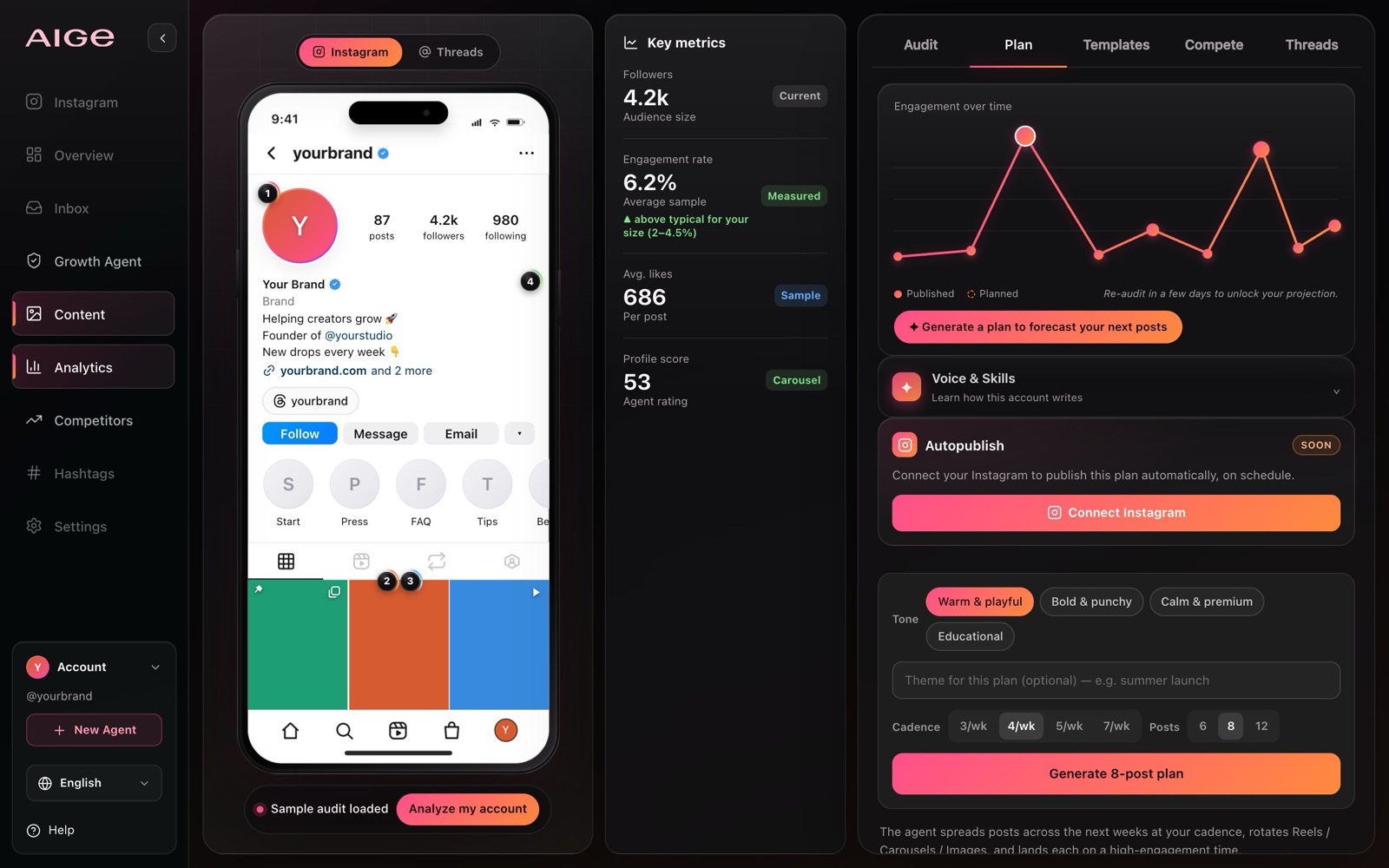
Open the Plan tab. Pick a posting cadence (3, 4, 5, or 7 a week) and a plan size (6, 8, or 12 posts); the agent drafts formats, angles, captions, and times, then charts your growth trajectory: where the account's been and the range it can reach if you follow through. Honest note: forecasts are ranges, not promises. Nobody can guarantee follower counts, and the agent doesn't pretend to.
Under the trajectory sits your Voice Card: the tone the agent learned from your captions, plus hooks and calls to action that already work here. Promote it to your brand voice and the Ideas tab writes in it too. A Connect Instagram card up top previews what's next: a live account whose approved posts publish on schedule. Honest note: it's gated behind a subscription and still answers "coming soon" for now. The consent and moderation groundwork is built; the live Meta connection isn't switched on yet.
Open any planned post to generate its image, edit the caption, or expand it into a multi-slide carousel, covered below. When the plan looks right, export the whole thing as Markdown and take it anywhere.
Start from an idea, not a blank page
The newest tab is Ideas. Instead of waiting for an audit to tell you what to fix, you type or speak a rough thought and the agent turns it into a content brief. Type a line like "before and after using our glaze recipe," or hold the mic for up to 90 seconds; it transcribes what you said into an editable box. Composing needs you signed in; a free account is enough, no subscription required.
Tap one of ten style recipes (cinematic film noir, soft pastel, and more) to steer the visual direction first, if you like. What comes back is a full brief: topic and angle, hooks, recommended formats (carousel, single image, video, caption only) each with a plain-language reason, ready-to-copy captions with hashtags, and per-model prompts with credit cost shown upfront. "Add to plan" drops it into your calendar once you've analyzed an account; "Build carousel" opens the editor with the brief already loaded.
Build a carousel without leaving the tool
Any plan post or brief flagged as a carousel opens a real slide editor, not a preview of one. It's a genuine Atelier design underneath, one page per slide, so a deck started here can move to the full Atelier editor with nothing lost.
Pick one of six template collections (studio dark, paper editorial, bold poster, soft pastel, tech mono, luxe serif) and it applies a matching palette, type, and layout to every slide at once. A brand panel stamps your handle, avatar, and accent colors across the deck and remembers the choice next time. Generate art slide by slide or all together, and an in-builder chat can rewrite copy or build the whole deck from a description. With consent, the agent studies your recent post covers first, so results match colors and habits you already use.
Prefer a blank canvas to a pre-filled brief? The Atelier carousel guide covers that path end to end.
Step 5: Go deeper when you're ready
Templates: caption and hook templates generated in your tone, on your topics. Free, no credits.
Threads: flip the phone to Threads and the same panel drafts text posts for that audience instead.
Compete: benchmark up to 3 competitors side by side and see exactly where you lead.
Chat: lives inside Audit now, not its own tab. Ask about your findings, or ask it to draft posts: it can propose a few in the thread for you to confirm into your plan.
It speaks your language
The whole workspace runs in 10 languages, and a real analysis (captions, templates, findings) follows the language of the account you're auditing. Switch languages mid-session and a live audit retranslates. Honest note: the sample audit before sign-in is a local, rule-based preview, not a Gemini call, so its findings stay in English regardless of UI language. A real analysis doesn't have that limit.
Quick answers
Question | Answer |
|---|---|
Does it post to Instagram for me? | Not yet. A Connect Instagram card in the Plan tab previews it, but publishing isn't live: the agent prepares everything and you post. |
What's free? | The sample audit and your first account analysis. Free plans keep one account in history; subscriptions track more. |
What costs credits? | Generating images: avatars, posts, plan visuals, carousel slides. Bio rewrites, grid order, templates, chat, and briefs are free. |
Private account? | Use manual entry; the audit works from the details you provide. |
What's the Ideas tab for? | Turning a rough idea, typed or spoken, into hooks, formats, and ready captions for your plan or a carousel. |
Do this first
Open the Growth Agent, paste your handle, and fill in the audience field properly. That one sentence separates generic advice from advice that fits. Your first audit takes under a minute; the tutorial inside the tool (the ? button in the sidebar) covers the rest.
Comments
Be the first to comment.