Ask for a 16:9 picture with one side left empty, then add the words yourself. AIGE makes the picture on the Canvas with Recraft Flash for 1 credit; Atelier then sets your text, brand colors and logo on a 1280 by 720 canvas and exports a JPG.
What YouTube asks for in a thumbnail
These points come from YouTube's own Help page on custom thumbnails, read on 28 October 2026. YouTube changes its pages, so check it before you plan around a number.
Account. The page says you can pick from auto-generated suggestions, or upload your own if your account is verified. Without verification you cannot upload the file this guide makes.
Shape. For videos, the page says to try for an aspect ratio of 16:9. For Shorts it says 9:16.
Size. The page recommends 3840 by 2160 pixels for videos, with a minimum width of 640 pixels.
Format. It asks for image formats such as JPG or PNG.
File size depends on the device. Uploading from mobile, a video thumbnail has to stay under 2 MB. From a computer the limit is 50 MB.
Atelier, AIGE's design editor, has a YouTube Thumbnail format at 1280 by 720. That is 16:9 and clears the 640 pixel minimum, but it is smaller than the size YouTube recommends. Atelier exports at 1x, 2x or 3x, and 3x of 1280 by 720 is exactly 3840 by 2160. If ratio notation is new to you, what is an aspect ratio explains it, and what is AI image resolution explains why a bigger file is not the same as more detail. For the video itself, and for YouTube's Shorts rules, see AI video for YouTube.
Step 1: make a 16:9 picture with room for text
The picture comes from the Canvas on a laptop. Open the Make sheet from the hexagon button in the prompt island, pick the Picture tab and the Recraft Flash tile (Manual mode does not list it), and set Ratio to 16:9. Recraft Flash has no Size row. A How many row, 1 to 4, sets how many takes one turn makes. The model picker guide covers where each tile sits and what a turn costs.
Write the empty side into the prompt as a fact about the frame. Our three prompts each named the bare part, for example "the left two thirds of the frame is a plain, empty, matte teal wall with nothing on it, left open as quiet space". Each also named a camera, a lens, a light and an angle, and ended with "no text, no logos, no letters, no faces". The prompt guide lists those slots.
Recraft Flash takes words only: no reference photo and no saved character. If the thumbnail needs your own face, pick a model that accepts references; the picker guide lists the tiles.
What came back: how much room each picture left for text
Three 16:9 pictures, 1 credit each on Recraft Flash. All three files are 1024 by 576 pixels. Here is what each one shows, including where it missed the brief.
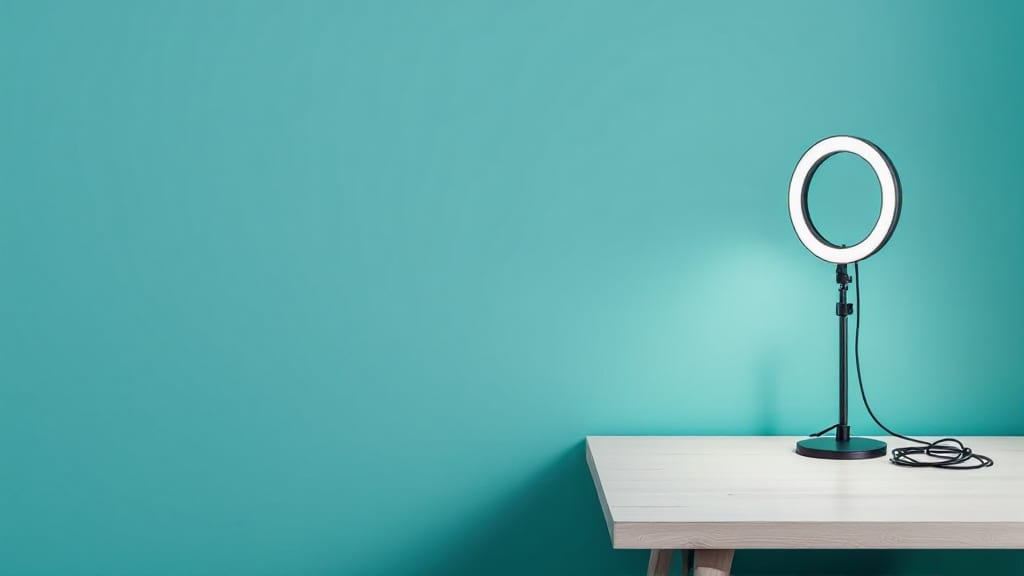
A ring light on a table. The stand and its cable sit at the right. The left half and a little more of the frame, and the whole top, are bare teal wall. The prompt left two thirds open, and the table's corner comes in a bit before that. The brightest patch of wall is a pale glow to the left of the stand, below the ring, so the light seems to come from the ring itself, not from the softbox on the left that the prompt named. In this picture the light did not come out as described.
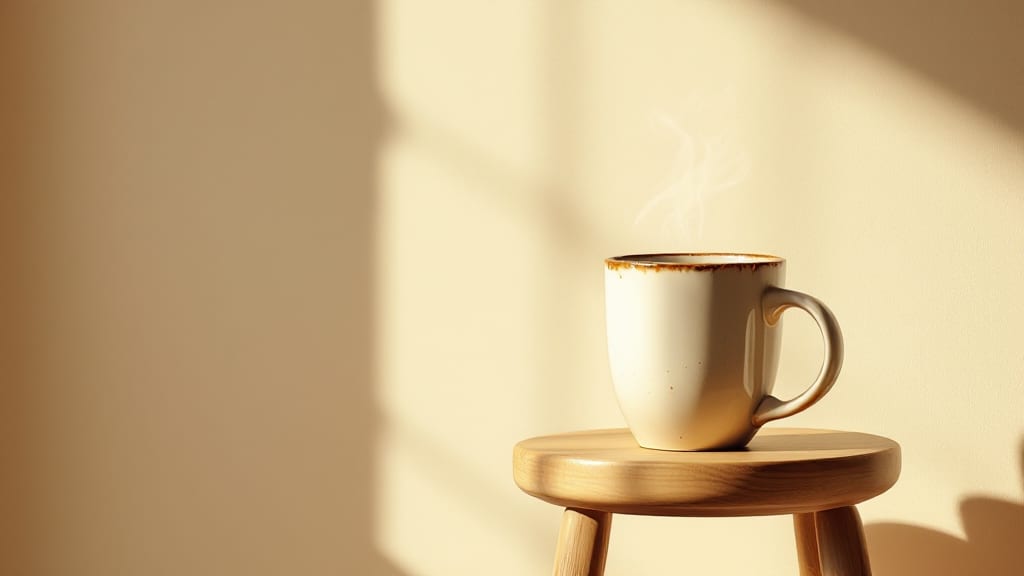
A mug on a stool. The mug and stool sit in the right half of the frame, not the right third the prompt asked for. The left third or so of the wall is in shade, a fairly even, darker tan from the edge; past it the wall turns bright with sun and soft window-shadow patches. That is not the evenly lit backdrop the prompt described. Words set inside the shade would sit on one tone. Words that run into the sunlit wall would change background mid-line and would need a shadow or an outline to hold.
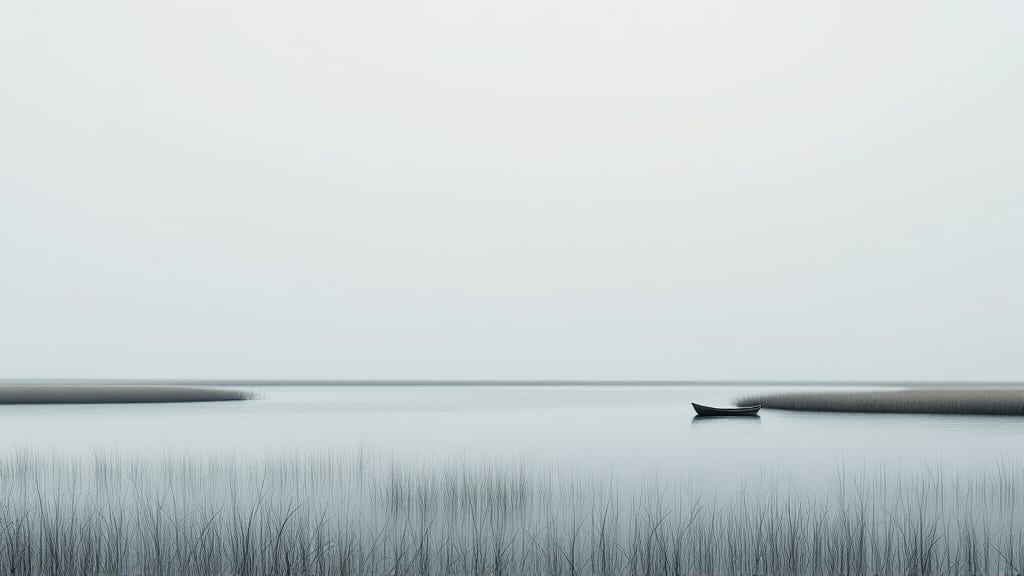
A rowing boat on a gray lake. The horizon sits about two thirds of the way down, so the pale sky above it is empty. It is the cleanest space of the three. It missed twice: we asked for a gray-green lake and got near-colorless gray, and the boat sits in the right third but well short of the edge the prompt named.
Two first takes were thrown out. A camera on a tripod and a pair of headphones each carried a small mark that looked like a wordmark, with garbled letters, though the prompt said "no text, no logos, no letters". Each was re-rolled once, with a ring light and a mug, objects with no obvious place for a badge. That was 2 credits extra. It is also the point of the next step: a model that prints letters you told it not to print cannot be trusted to spell the ones you ask for.
Step 2: put the words on in Atelier
AIGE's own image generator page says small text inside an image can still come out wrong and should be checked before you publish. So type the words in Atelier, where they are real text on a layer, not pixels the model drew. Atelier needs a signed-in account.
Download the picture from the Canvas. The right-click menu on an image has Download.
Go to aige.ws/atelier while signed in. On its home screen, under Start a design, choose YouTube Thumbnail, 1280 by 720.
Drag the picture file onto the stage. It lands where you drop it, at about half the frame's width and with its own proportions. Resize it to fill the frame; a 1024 pixel picture stretched to 1280 is enlarged by a quarter. The Uploads tab also takes PNG, JPG, WebP and SVG, but its button places a square box, so check how the picture sits in it.
In the Text tab, add a heading. Type your words, then set the font, size and color in the toolbar over the stage. Shadow and Outline are among its effects.
Keep the type big. AIGE's own starter templates for this format hold every text layer at 34 pixels or more on the 1280 by 720 canvas, and a test fails if one slips under.
If you would rather start from a layout, the gallery has eleven templates at this size: Creator Thumbnail, Reaction Face, How-To Tutorial, VS Comparison, Podcast Episode, Top 10 List, Gaming / Stream, Tier List Ranking, 30-Day Challenge, Tech Review Spec Strip and Breaking News Banner. They are starting points, with placeholder words you replace.
Atelier also has an AI tab that generates a picture straight onto the page, at 16:9 for this format. It runs Nano 2.1 at 1K for 8 credits. Atelier's own hint under the Generate button still uses the older name, Nano Banana 2. It is the pricier route to a first draft. Recraft Flash is the cheap one.
Step 3: set your brand kit once
The Brand tab holds your colors, fonts and logos and reuses them across every design. A kit keeps up to 24 colors, 12 fonts and 12 logos.
Colors. Select a text layer or a shape and press + Color to save its color. Press a swatch later to apply it to whatever you have selected.
Fonts. Select a text layer and press + Add selected font, or press + Upload font and give it a .woff2, .woff, .ttf or .otf file.
Logos. Press + Upload logo, then press the logo to drop it on the canvas.
AIGE does not generate logos, so the logo in the kit is one you made or own. The kit does not apply itself. On each new thumbnail, select a text layer or a shape, then tap a swatch or a font. That puts the third thumbnail in a series on the same colors and font as the first, with no hex code to hunt for.
Step 4: export, then check the file
The Export menu starts on 2x and also offers 1x and 3x. For files it offers PNG, PNG with a transparent background, JPG and WebP. YouTube's page names JPG and PNG, so pick one of those. JPG is encoded at quality 0.92.
At 1x the file is 1280 by 720. At 3x it is 3840 by 2160, the size YouTube recommends. The text you typed is drawn at the export size, but the picture under it is not: a 1024 pixel picture at 3x is stretched, and the extra pixels are not extra detail.
Then check the number that can bite. YouTube's limit is 2 MB from mobile and 50 MB from a computer, and we did not measure an Atelier export, so look at the size of yours. The export runs in your browser and takes no credits. AIGE does not upload to YouTube, so you add the file to your video yourself.
Honest note: No click data is claimed here. Nothing in this article tests whether a thumbnail earns more clicks or views. What you get is a clean 16:9 picture with room for text, your words and colors on top, and a file in a format YouTube names. The three pictures are quick drafts: AIGE's own model guide steers photorealism away from Recraft Flash, they are 1024 by 576 pixels, and two first takes carried garbled marks. They were made through AIGE's API, and we did not measure what the Make sheet returns. Recraft Flash cannot use your face. YouTube's numbers are from its Help page in October 2026 and may have changed. The Canvas steps are for the laptop canvas.
Quick answers
Question | Answer |
|---|---|
What size is a YouTube thumbnail? | YouTube's Help page, read in October 2026, recommends 3840 by 2160 pixels for videos, with a minimum width of 640, a 16:9 shape, JPG or PNG, and a file under 2 MB from mobile or 50 MB from a computer. Atelier's YouTube Thumbnail format is 1280 by 720, and a 3x export reaches 3840 by 2160. |
Is there an AI YouTube thumbnail generator in AIGE? | There is no one-button generator. You make a 16:9 picture on the Canvas, then build the thumbnail in Atelier's YouTube Thumbnail format with your own text, colors and logo. |
Will an AI thumbnail get more clicks? | Nothing here can say. This article collected no click data and tested no thumbnail against views. |
Can the AI write the words on the thumbnail? | AIGE says small text inside an image can still come out wrong. Both discarded first takes here printed garbled marks unasked. Type the words in Atelier's Text tab instead. |
How much does one AI thumbnail cost? | One Recraft Flash picture is 1 credit, and from 3 credits with the agent turn's fee. Four takes in one turn are from 6 credits. Atelier's text, brand kit and export take no credits. |
Can I make a thumbnail for free? | Not with a generated picture: AIGE's own page says every generation is paid in credits. The Atelier steps after the picture, text, brand kit and export, charge none. |
Can Recraft Flash use my face? | No. Recraft Flash takes words only: no reference photo and no saved character. |




Comments
Be the first to comment.