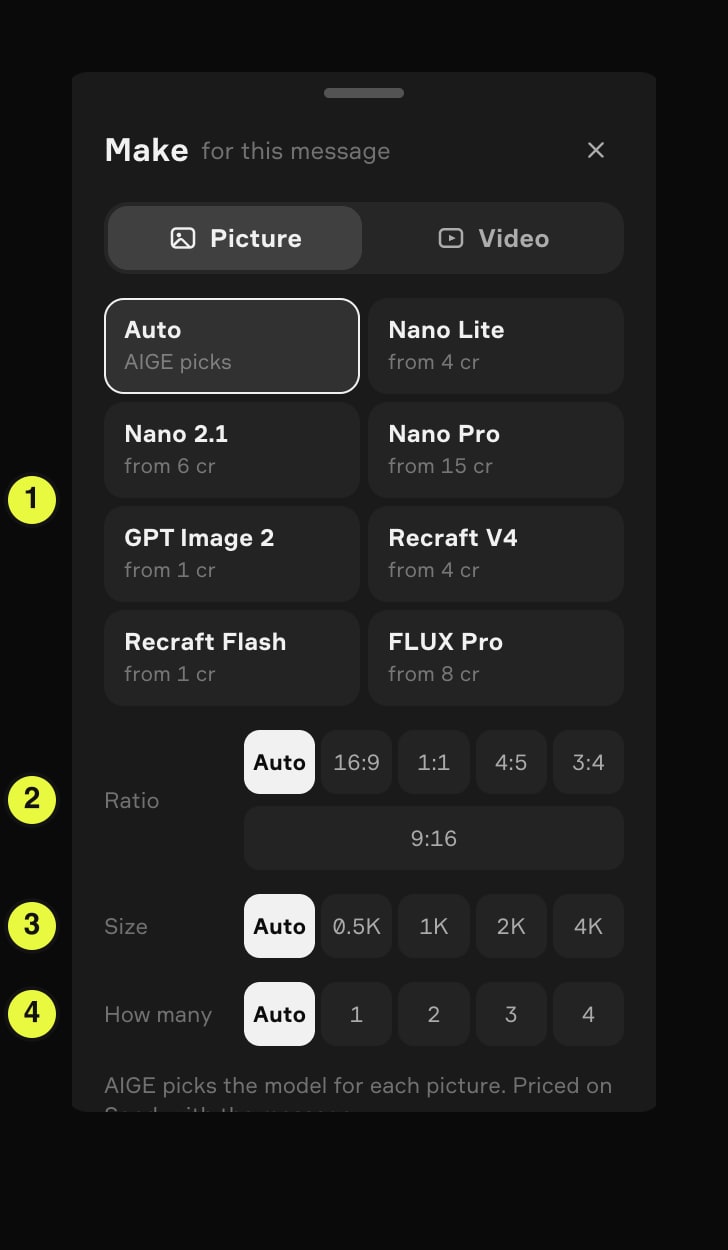
AIGE's picture picker has three Nano Banana tiles (Nano Lite, Nano 2.1 and Nano Pro) next to GPT Image 2 and Recraft. Not sure which? Leave it on Auto and AIGE chooses for each picture. Every model tile shows a from price in credits, starting at 1 credit.
The Make sheet sets four things, and an agent turn can leave each on Auto
The picker is a sheet called Make, with "for this message" beside the title. It has a Picture tab and a Video tab, and this article stays on Picture. On a laptop it opens from the hexagon button in the prompt island, the one beside the thinking dial. The phone board has its own version of the sheet, opened from the hexagon beside the dial in its composer. The phone board is switched on per account, and anyone can try it signed out on a phone at aige.ws/?try=1.
The picture at the top of this page is the Make sheet on a signed-in laptop, from aige.ws on 28 October 2026: eight model tiles, then the Ratio, Size and How many rows. The yellow badges are ours, and they mark the four things you can set:
Model. Auto when an agent runs, then one tile per model. A tile pins that model.
Ratio. The shape of the frame. What is an aspect ratio? covers the shapes.
Size. 0.5K up to 4K. What is AI image resolution? covers what each step buys.
How many. One to four pictures from one message.
Which sheet you get depends on the thinking dial. With the dial on Fast, Auto or Deep, an agent works each turn, and the laptop shows the full sheet from the picture. Every row starts with Auto. Leave a row on Auto and AIGE decides; set a value and AIGE uses it. Pick a model and the rows follow what it takes: Nano Lite, Recraft V4, Recraft Flash and FLUX Pro have no Size row at all.
With the dial on Manual there is no agent, and the laptop opens the phone board's sheet instead. That one has no Auto, no Recraft Flash or FLUX Pro, and a set value in every row.
What each model is for
AIGE's agent works from one routing guide that sorts the models by job, and the table follows it. It lists jobs, not a ranking. Results differ by subject, so run one prompt on two models before you settle. Prices are the ones on the tiles on 28 October 2026. The table follows the laptop's agent sheet, and Recraft Flash and FLUX Pro are only on that one.
Tile | What AIGE's guide uses it for | Tile price |
|---|---|---|
Nano Lite | Drafts, moodboards and bulk ideas | from 4 cr |
Nano 2.1 | Everyday work: portraits, people, product and photoreal shots. The guide's default | from 6 cr |
Nano Pro | Complex scenes with several subjects, finished hero images, and 4K | from 15 cr |
GPT Image 2 | Words inside the image: posters, covers, menus | from 1 cr |
Recraft V4 | Illustration, icons, flat design and stickers | from 4 cr |
Recraft Flash | Quick, cheap illustration drafts | from 1 cr |
FLUX Pro | A photoreal look that differs from the Nano models | from 8 cr |
Four notes the table cannot hold:
Names. Nano Banana is Google's name for its Gemini image models, and the three Nano tiles are AIGE's versions of it. AIGE's guides call Nano 2.1 Nano Banana 2, and the Nano Pro tile is Google's Gemini 3 Pro Image. The Nano Banana and Gemini article sorts out the names. Recraft V4 is called Recraft 4.1 on AIGE's model pages.
Faces. If one person has to look the same in every picture, use Nano 2.1 or Nano Pro with a saved character, as the AI character generator page describes. AIGE's guide tags both for character consistency and lists strict face continuity as a poor fit for GPT Image 2 and FLUX Pro. The Recraft tiles take text only and cannot use a picture you attach.
Words in pictures. GPT Image 2 is where AIGE's guide sends text, but small text can still come out wrong. Read every word before you publish.
Nano 2.1 or Nano Pro. Nano 2.1 costs less at 1K and 2K, and Nano Pro costs less at 4K: 30 credits against 48 credits. The Nano Banana Pro page has the full comparison.
The words you type matter as much as the tile. The prompt guide has a template that names the camera and the light.
What Auto does
Auto is the first tile, and it reads "AIGE picks". The note under the rows says the same: "AIGE picks the model for each picture. Priced on Send, with the message." The choice is made by AIGE's agent, working from the guide above. AIGE's guide tells the agent to send everyday photoreal and character work to Nano 2.1, drafts and bulk to Nano Lite, words inside the image to GPT Image 2, icons and vector-style art to Recraft V4, and complex scenes or 4K to Nano Pro. Those are rules of thumb, and the final call is the agent's.
Ratio, size and count follow the same rule. What you leave on Auto, the agent chooses, and what you set, it applies. Because no model is chosen until you send, the sheet cannot name a price for Auto. That is why the note says "Priced on Send".
The second half of that note, "with the message", means the agent's turn fee. A message that goes through the agent pays it on top of the pictures. The thinking dial sets it, with four stops: Manual, Fast, Auto and Deep. Manual sends your words straight to the model. It has no agent, no Auto tile and no turn fee, and the sheet adds up the exact total.
What a picture costs, and what moves it
A tile says "from" because each model has a cheapest setting and the tile quotes that one. Change a row and the total moves.
Setting | What it does to the price |
|---|---|
Model | The tile quotes that model's cheapest setting: Nano 2.1 at 0.5K, Nano Pro at 1K, GPT Image 2 on Low quality. |
Size | Nano 2.1 costs 6 credits at 0.5K, 8 credits at 1K, 16 credits at 2K and 48 credits at 4K. Nano Pro costs 15 credits at 1K, 20 credits at 2K and 30 credits at 4K. As of October 2026, Starter covers up to 2K, and 4K starts at the Pro plan. |
Quality | GPT Image 2 only. Low is 1 credit at 1K. Medium and High cost up to 6 credits and 22 credits at 1K, depending on the shape of the frame. A fresh phone sheet starts on Medium. The Quality row is on the phone's sheet, which Manual also uses on a laptop; on a laptop agent turn there is no Quality row. |
How many | The model's price times the number of pictures, one to four. |
Agent turn | Fast starts at 2 credits a turn, Deep at 6 credits, and Auto runs between the two. Manual has no turn fee. |
Here is the arithmetic for a product shot. Three Nano Lite drafts to find the angle come to 12 credits. Then you run the settled prompt once on Nano 2.1 at 2K for 16 credits. That is 28 credits of pictures, before any turn fee. Expect the 2K run to be a new take, not the draft enlarged, because AIGE picks a fresh seed on every run.
In the phone board demo, the list is shorter
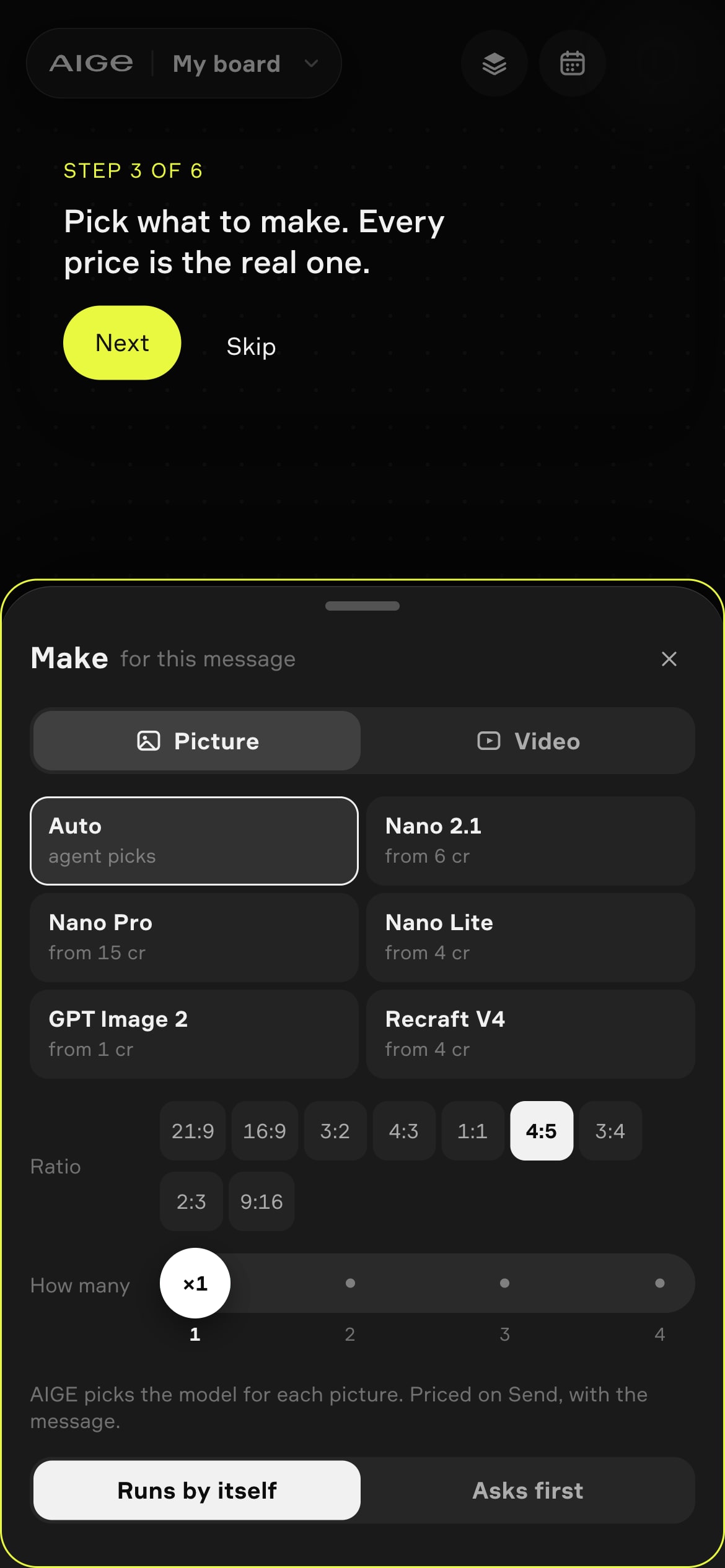
The Make sheet in the phone board demo at aige.ws/?try=1, signed out (step 3 of 6 of its guide), on 28 October 2026.
The demo shows the phone board's sheet at phone size. A signed-in phone gets that board only when AIGE has switched it on for the account. Auto reads "agent picks", and the tiles are Nano 2.1, Nano Pro, Nano Lite, GPT Image 2 and Recraft V4, each with a from price. Below them sit a Ratio row, a How many slider from 1 to 4 and the same note about pricing on Send.
That is a shorter list than the laptop's agent sheet shows, and it is not the whole picker. In AIGE's code the phone sheet carries a curated subset of the model catalog, and an agent turn on the laptop carries all of it. So Recraft Flash and FLUX Pro show on the laptop's agent sheet and not on the phone's list. A laptop in Manual uses the phone's sheet, so it gets the shorter list too. The list changes as models are added.
The switch at the bottom, Runs by itself or Asks first, is about the agent, not the model. Runs by itself goes ahead without asking, and Asks first checks with you before it spends.
Honest note: a from price is a starting point, not a quote. Size, quality, count and the agent's turn fee all move the total, and with Auto the sheet cannot name a model's price until you send. The jobs in the table are AIGE's own guidance, not a test this article ran. The screens show the product on 28 October 2026, and the phone shot comes from the signed-out demo.
Quick answers
Question | Answer |
|---|---|
Which image model should I pick in AIGE? | Leave it on Auto if you are unsure. To choose yourself, AIGE's guide points drafts to Nano Lite, everyday pictures to Nano 2.1, complex scenes and 4K to Nano Pro, words inside the image to GPT Image 2 and illustration to Recraft. |
What does Auto do in AIGE's model picker? | It leaves the model to AIGE's agent, which works from AIGE's routing guide. The sheet cannot name a price until you send, because no model is chosen yet. Manual has no Auto. |
What does "from N cr" on a model tile mean? | The model's cheapest setting, such as Nano 2.1 at 0.5K or GPT Image 2 on Low quality. A bigger size, a higher quality or more pictures raises the total. |
Which AIGE image model is the cheapest? | GPT Image 2 shows from 1 cr, on its Low quality setting, and Recraft Flash shows from 1 cr. Those are the lowest tiles on the laptop's agent sheet. GPT Image 2 on Low is also the cheapest tile in Manual, where there is no turn fee. Recraft Flash is only on the agent sheet, so an agent turn, from 2 credits, comes on top. Nano Lite shows from 4 cr. |
Is there a Nano Banana image generator in AIGE? | Yes. The picker has three Nano Banana tiles: Nano Lite, Nano 2.1 and Nano Pro. Nano Banana is Google's name for its Gemini image models, and the Nano Banana page lists the versions and prices. |
Does picking more pictures cost more? | Yes. You pay the model's price for each picture, and one message makes one to four. |
Where does the prompt go in AIGE's image generator? | In the message box, in the same bar that opens the sheet. The prompt guide has a template, and the AI image generator page lists the models and prices. |




Comments
Be the first to comment.