
Open AIGE signed in, type what you want in the prompt bar, and tap the pill beside it to set shape, count and model. Read the price on the Generate button and tap it. The picture arrives as a card: tap it twice, then the download arrow. Most phones get this grid, not the phone board.
Which phone screen you have
Open aige.ws in your phone's browser and sign in. AIGE has two phone screens, and your account decides which one opens. The phone board is switched on per account and is off by default, so a signed-in phone usually opens the classic grid: your pictures as cards, a prompt bar that says Describe what to make, and a tab bar with Home, Apps, Vault, AIGORA and Generate.
If your bar says Ask AIGE beside a small dial, you have the board instead. Steps 1 to 5 follow the grid, the screen most accounts get as of 28 October 2026. The last section covers the board, which anyone can open signed out at aige.ws/?try=1 on a phone. The AIGE board on your phone walks through it screen by screen, and AIGE on phone vs laptop sets it beside the laptop canvas.
1. Describe the picture
Tap the prompt bar and type. Once you have pictures it sits at the bottom of the screen; on the empty home of a brand-new account it sits in the middle, over a wall of example cards, and moves down after your first picture. The field grows as you write. Name the thing, say where it is and say what the light is like: "a red bicycle leaning on a brick wall at dusk, soft light from the left" gives a model far more to work with than "bike". What is a prompt in AI image generation covers the parts of a good prompt.
The plus at the left end of the bar attaches a picture for the model to start from or change. Leave it alone for a first picture. One catch for later: Recraft reads words only, so a picture you attached does not reach it. The sparkle at the right end opens the Prompt Assistant, a chat for working out what to write.
2. Open the pill for shape and count
Beside the plus sits a small pill with three parts: a model name, a tiny rectangle showing the current shape, and a count such as x1. Phones narrower than 360 pixels hide the name. Tap the pill. On a screen under 560 pixels wide, a sheet rises from the bottom and the page dims behind it. Tap the dimmed area to close it.
From the top, the sheet holds an Image and Video switch (stay on Image), a row of shapes, a row for how many, the model, an extra row for the models that have one, and a last line that reads Generating will use N credits.
Shape is the frame of the picture. The grid offers six: 16:9, 4:3, 1:1, 4:5, 3:4 and 9:16. A fresh session starts on 1:1, a square. 16:9 is wide like a TV screen, and 9:16 is tall like a phone held upright. What is an aspect ratio says what each is for.
How many is 1x, x2, x3 or x4. One tap on Generate then makes that many pictures from the same words, and each is its own run with its own price, so x4 costs four times one. They will not match each other.
3. Pick a model and a size
Tap the model name in the sheet for a list of five: Nano 2.1, Nano Lite, Nano Pro, Recraft 4.1 and GPT2. A fresh session starts on Nano Lite. The extra row under the model changes with your pick:
Model in the list | What AIGE's own guide uses it for | Extra row in the sheet | One picture, 1:1 |
|---|---|---|---|
Nano Lite | Drafts, moodboards and quick tries. The guide advises against it for final hero images and fine text. | None | 4 credits |
Nano 2.1 | Everyday work: portraits, products and photoreal shots. The guide's default. | Size: 1K, 2K, 4K | 8 credits at 1K, 16 credits at 2K, 48 credits at 4K |
Nano Pro | Complex scenes with several subjects, and finished hero images. | Size: 1K, 2K, 4K | 15 credits at 1K, 20 credits at 2K, 30 credits at 4K |
Recraft 4.1 | Illustration, icons, flat design and stickers. The guide advises against it for photorealism. | Flash, Std, Pro | 1 credit on Flash, 4 credits on Std, 25 credits on Pro |
GPT2 | Words inside the picture: posters, covers, menus. | Quality: Low, Mid, High | 1 credit on Low, 6 credits on Mid, 22 credits on High, at 1K |
Nano 2.1 and Nano Pro also show a small globe button beside the size row. It turns on web-grounded generation and adds 1 credit, so leave it off for a first picture. On GPT2 the shape also nudges the price at 1K. A size your plan does not include can carry the plan's name beside it. What is AI image resolution explains what the bigger sizes buy, and which image model to pick in AIGE compares every tile.
Settings belong to the project you are in, and a new project starts on the defaults again, so check the pill before each picture.
4. Read the price, then tap Generate
On a phone the bar's own Generate button is hidden. The Generate button in the tab bar does its job and carries the price on a second line, such as 4 cr on a fresh session. The last line of the sheet says the same number in words, and both read one calculation.
The grid sends your words straight to the model you picked, with no agent in between, so the number is exact: that model's price times the count. It stays faint until the field has words, and it moves whenever you change the model, the size or the count, or on GPT2 the shape or the quality. Some examples:
A fresh session, Nano Lite, x1: 4 credits.
Nano Lite, x4: 16 credits.
Nano 2.1 at 1K, x2: 16 credits.
GPT2 at 1K, 1:1, x1: 22 credits, because the grid starts GPT2 on High. Drop Quality to Low and it reads 1 credit.
Now tap Generate. With an empty field nothing happens. If you scrolled down, the tab bar folds into its Generate button and the bar folds away with it. The first tap brings both back, and puts the cursor in an empty field. The next tap sends.
If your balance cannot cover the price, the tap opens a credit prompt that links to the plans, and nothing is made. A new account starts with 0 credits, so its first tap lands there: pictures need credits from a paid plan. AI image generator without sign-up has the details. Your balance is a tap away on your avatar, top right.
5. Watch the card, then save it
The moment you tap, a placeholder card appears in the grid, a tile of moving dots labeled In progress, and the Generate button's price turns into three dots. A run of several pictures puts that many placeholders in at once. Each picture replaces its placeholder as it arrives, and a run of more than one ends with a toast that reads Generated N images. On an empty home, the first run also creates a project named from the first 40 characters of your prompt. Everything you make is kept in your history, which the Vault tab opens.
To save a picture, tap its card once. A short row of buttons appears over the bottom edge, which on a phone is three icon buttons with no words on them: Create, Export and More. Export offers Clean original, which saves without an AIGE watermark, and Share-ready, which saves with the AIGE watermark.
Or tap the card a second time to open it larger. The bar under it is a row of icons with no words on a phone. The download arrow saves the clean original and briefly turns into a check mark once the file is on its way, and your phone's browser decides where the file lands. Download and export your AI images and videos covers formats and the laptop side.
What the phone board shows instead
If your phone says Ask AIGE, the job is the same and the controls differ. This is the bar in the signed-out demo at aige.ws/?try=1, not the grid.
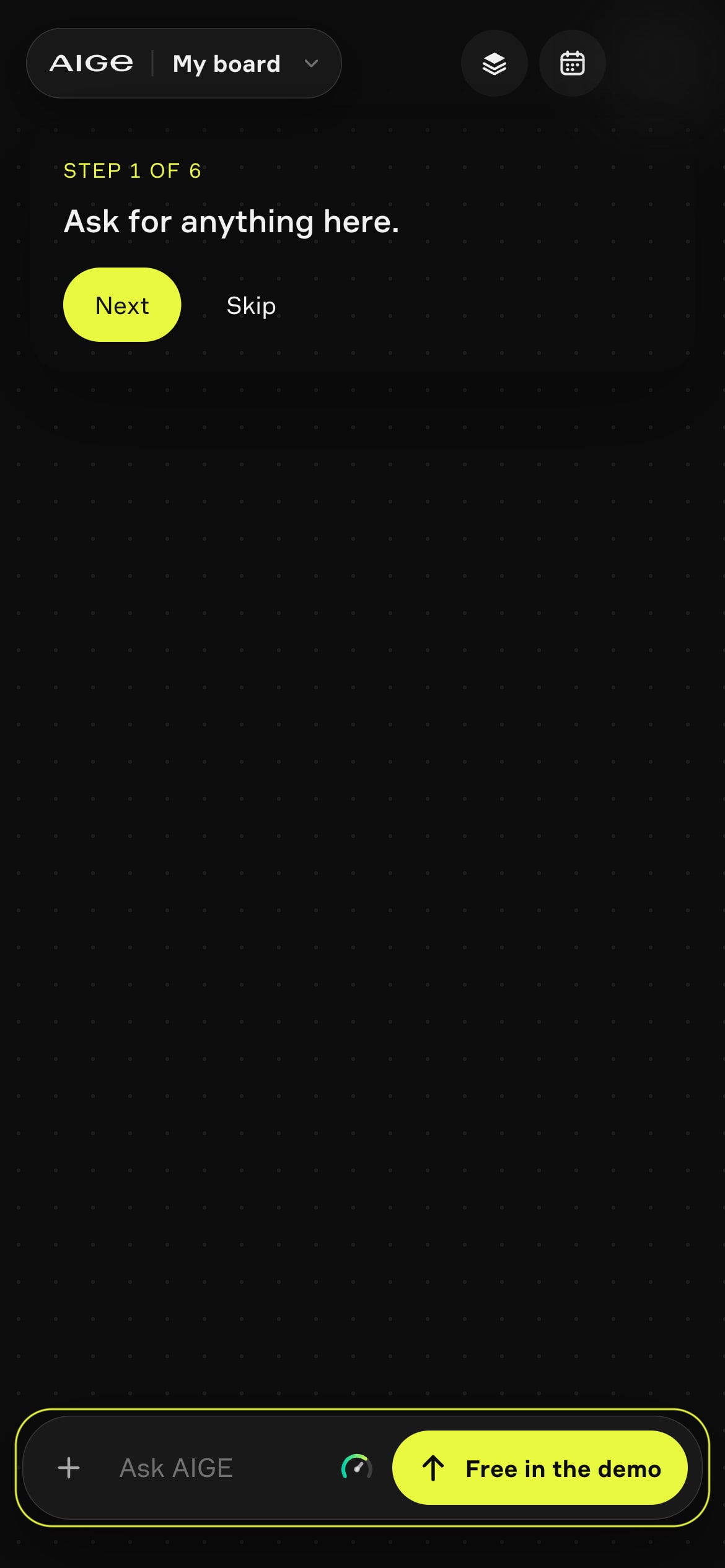
A dial. It sets how hard AIGE works: Manual, Fast, Auto or Deep. Manual sends your words straight to the model, as the grid always does. The other three hand the message to the AIGE agent first.
A Make sheet. Tap the bar to open it, and the hexagon pill under your words opens the sheet, with Picture and Video tabs, tiles for Auto, Nano 2.1, Nano Pro, Nano Lite, GPT Image 2 and Recraft V4, nine shapes from 21:9 to 9:16 with 4:5 selected, and a How many slider from 1 to 4. The tiles say from because each quotes its model's cheapest setting, so Nano 2.1 reads from 6 cr at the 0.5K size, which the grid's size row does not offer.
A different price on Send. In Manual it is exact. On an agent stop it reads from and a number: the turn fee's floor, 2 credits on Fast and Auto and 6 credits on Deep, plus the price of a model you pinned in Make. The agent's fee is metered above that floor. With Make on Auto the pictures are priced on top of the turn fee.
A demo Send. In the demo it reads Free in the demo and plays a prepared picture whatever you type. Nothing is made and no credits move.
Honest note: the numbered steps describe the classic grid and were read from AIGE's code on 28 October 2026, not recorded on a phone, so there is no screenshot of the grid here. The one-tap and two-tap card behavior, the folded tab bar and the credit prompt are described from the code and were not run for this piece. The one screenshot shows the signed-out demo board at aige.ws/?try=1 (390 by 844), not the grid. The phone board is switched on per account, so a signed-in phone opens it only when it is on for that account. The grid names the models Recraft 4.1 and GPT2, where the board says Recraft V4 and GPT Image 2. Prices come from the credit table in the code, and buttons change, so trust the number on your screen.
Quick answers
Question | Answer |
|---|---|
How do I make an AI image on my phone with AIGE? | Sign in, type what you want in the prompt bar, set shape, count and model from the pill beside it, read the price on the Generate button and tap it. When the card arrives, tap it twice and press the download arrow. |
Is there a free AI image app on AIGE? | Not for making pictures. Creating an account costs nothing, but pictures need credits from a paid plan, and a new account starts with 0. The signed-out demo at aige.ws/?try=1 only plays a prepared example. AI image generator without sign-up has the details. |
What does the number on the Generate button mean? | In the grid it is the exact price of that tap: the model's price times how many pictures you asked for. A fresh session reads 4 cr for one Nano Lite picture. On the phone board, Send is exact only in Manual and shows a from number on an agent turn. |
Why does my phone say Ask AIGE instead of Describe what to make? | Your account has the phone board switched on. The board is per account and off by default, so most phones show the grid with Describe what to make. Everyone can try the board signed out at aige.ws/?try=1. |
What do x2, x3 and x4 do? | One tap makes that many pictures from the same words. Each is a separate run and is priced separately, so x4 on Nano Lite costs 16 credits. |
Which model should I pick for a first picture? | A fresh session starts on Nano Lite at 4 credits a picture, which AIGE's guide uses for drafts. Nano 2.1 is the guide's everyday choice at 8 credits for a 1K picture. Which image model to pick in AIGE compares them all. |
Does downloading a picture cost credits? | No. Download fetches a file that already exists. Credits go on making the picture, not on saving it. |



Comments
Be the first to comment.