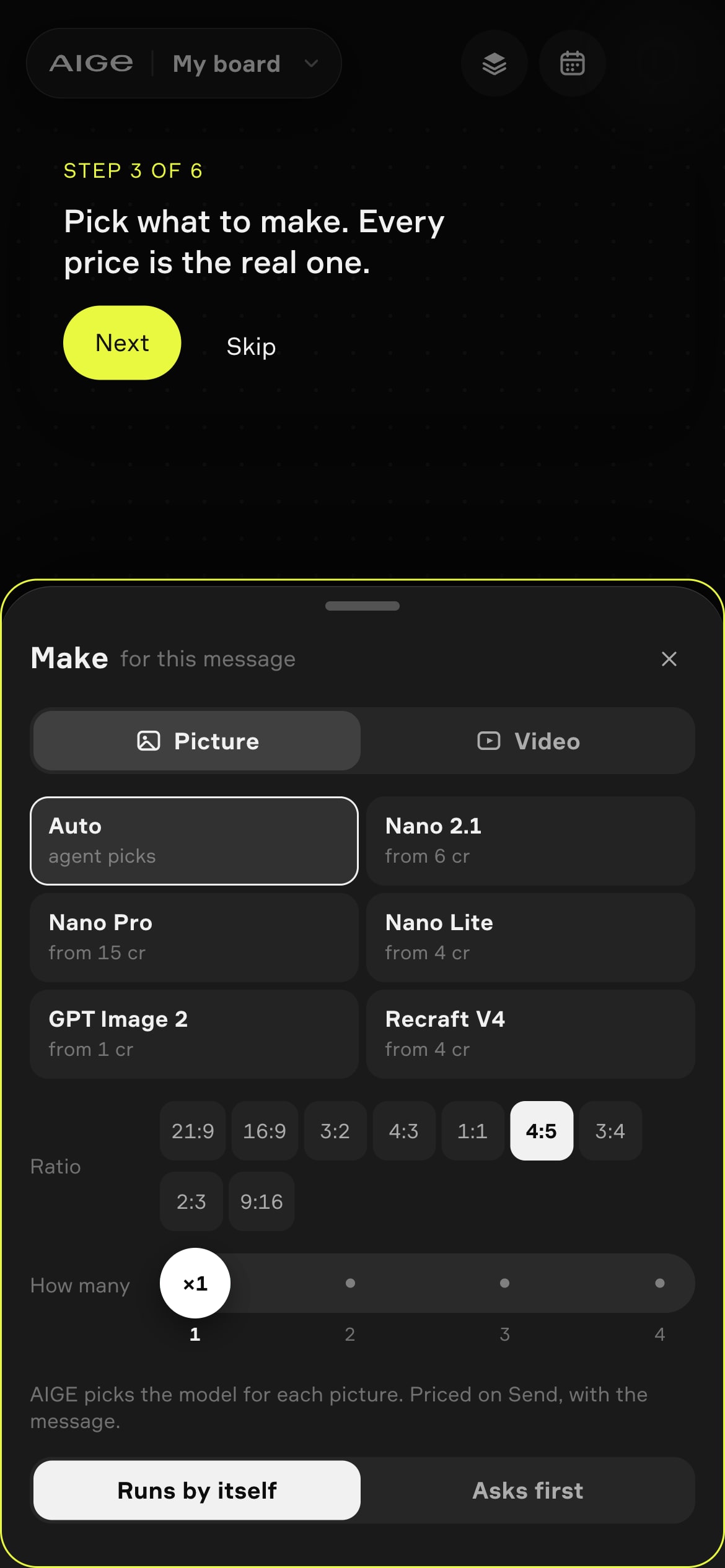
Nano Banana is Google's name for Gemini's image models: describe a picture, or add a photo and say what to change, and it makes the image. AIGE's Make sheet has three Nano tiles, Nano 2.1, Nano Pro and Nano Lite, from 4 credits a picture.
What Nano Banana does
In plain terms it is the picture-maker inside Google's Gemini AI. How the name came about, and which Gemini model sits behind each Nano Banana name, is covered in Is Nano Banana the same as Gemini. This article stays with what it does for you in AIGE.
The jobs it does:
Makes a picture from words. Type a line, get an image.
Edits a photo you add. Say what to change: a new background, an outfit, the light.
Builds one image from several references. Give it a face and an outfit, for example, and it combines them.
Keeps a face. In AIGE a saved character goes in as the reference, so the same person turns up across a set. That is character consistency.
The three Nano tiles in the Make sheet
You choose the picture model in the Make sheet, a panel titled "Make for this message" with Picture and Video tabs. On the canvas it opens from the generation settings button in the chat composer. On a phone you can try it signed out in the demo at aige.ws/?try=1, which is the screen in the picture at the top of this page. The sheet puts three Nano tiles, Nano 2.1, Nano Pro and Nano Lite, beside GPT Image 2 and Recraft.
Tile | What AIGE's guide suggests it for | The tile says |
|---|---|---|
Nano 2.1 | Everyday images and edits at 1K or 2K, where it costs less than Pro. The Size row offers 0.5K, 1K, 2K and 4K. | from 6 credits |
Nano Pro | You want Google's Pro model, or a 4K image. The Size row offers 1K, 2K and 4K. | from 15 credits |
Nano Lite | Quick drafts and ideas before a final render. No Size row: one size. | from 4 credits |
AIGE's guide splits the three by job, not by quality.
Which tile the Make sheet starts on
On the canvas and in the phone demo the sheet starts on Auto. Its line reads "AIGE picks" on the canvas and "agent picks" on the phone. With Auto, AIGE chooses the model for each picture and the price is set on Send, with the message, so the tile shows no number. Pin Nano 2.1, Nano Pro or Nano Lite and every picture in that message uses that tile, quoted "from" its smallest size.
Switch the composer to Manual, which sends straight to a model with no agent, and the Auto tile disappears because nothing would pick; an Auto choice falls to Nano 2.1. A signed-in phone sees the Make sheet only where the phone board is switched on for the account.
What a Nano Banana picture costs in AIGE
The tiles say "from" because each one quotes its smallest size. The Nano 2.1 tile's Size row starts at 0.5K, which is where its from 6 credits comes from. Nano Pro starts at 1K, from 15 credits. Nano Lite has one size, 4 credits.
The How many row, 1 to 4, multiplies the price: four pictures cost four times one. Bigger sizes cost more, and the per-size table is on the Nano Banana guide; Nano Pro has its own Nano Banana Pro page. What a credit is worth in dollars depends on your plan, so see pricing.
What Nano Banana does not do
It does not make video. A Nano Banana model outputs a still. To animate one, send the image to a video model from the same board, such as Kling V3 or Seedance 2.5; Can Nano Banana make videos covers that route.
It does not give the same picture twice. The same prompt gives different results from run to run. AIGE's guide says to generate a few and keep the best.
Nano Lite has no size choice. Nano 2.1 and Nano Pro take a size; Lite makes the one it has.
Honest note: Google's docs list legible, stylized text for menus, infographics and diagrams among the features, and AIGE's own guide still warns that small text inside an image can come out wrong. Read every word before you publish, and if a label has to be exact, add the text yourself afterwards.
Quick answers
Question | Answer |
|---|---|
What is Nano Banana? | Google's name for Gemini's built-in image generation. It makes a picture from a prompt, edits a photo you give it and builds one image from several references. |
What is Nano Banana Pro? | Google's Pro model in the Nano Banana line. In AIGE it is the Nano Pro tile, from 15 credits, which AIGE's guide suggests for Google's Pro model or a 4K image. The Gemini model behind the name is in the Nano Banana versus Gemini guide. |
What is Nano Banana 2? | One of the Gemini image models that carry the Nano Banana name. Which release Google lists as current is in the Nano Banana versus Gemini guide. AIGE's Make sheet labels its Nano tiles Nano 2.1, Nano Pro and Nano Lite. |
Which tile does the Make sheet start on? | Auto: AIGE picks the model for each picture and the price is set on Send. That holds on the canvas and in the phone demo at aige.ws/?try=1. |
Can Nano Banana edit my own photo? | Yes. Add a photo and describe the change: a new background, an outfit, the light. Several photos can be combined into one image. |
How much does a Nano Banana picture cost in AIGE? | The tiles say from 6 credits for Nano 2.1, from 15 credits for Nano Pro and from 4 credits for Nano Lite, each at its smallest size. The How many row multiplies the price. |
Can Nano Banana make videos? | No: it makes pictures. To animate one, send the image to a video model such as Kling V3 or Seedance 2.5; Can Nano Banana make videos covers the route to a clip. |






Comments
Be the first to comment.