
Not on AIGE. You can open the board and try a demo with no account, but the demo only shows a prepared example. Making your own pictures needs an account and credits from a paid plan, and a new account starts with none.
What you can try with no account
Signed out, a laptop opens the Canvas at aige.ws/canvas. You land on a real board with the real prompt island: a field that says "Ask for anything · / for a skill", a plus button, a dial for how hard AIGE thinks, a hexagon for model and generation settings, a button that opens the chat panel and a yellow send button. A phone opens the board at aige.ws/?try=1, with the same dial and send button in a composer. The Sign up buttons on the landing page lead to the same two places, so pressing one starts the demo instead of opening a form.
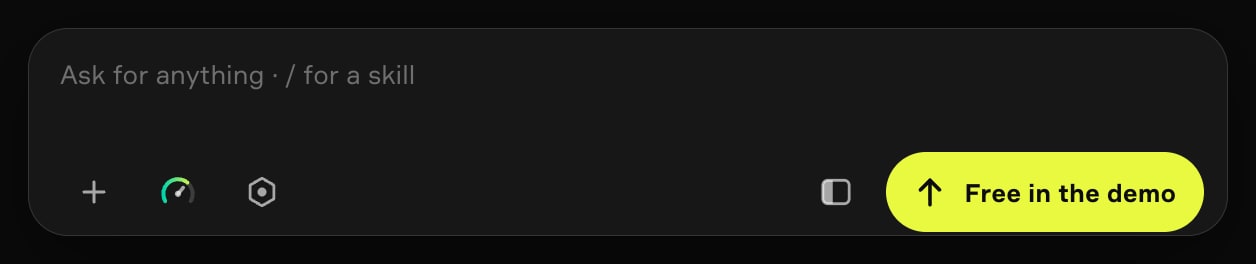
Read that send button. It says "Free in the demo", and it is not an offer of free pictures. On a real board that spot shows the credit price of your run. In the demo nothing is charged, because nothing is made, and the label says so.
A short guide walks you through the board, and you can skip it on any card.
The first cards point at the island, the dial and the picker where you choose what to make. The next one asks you to press Send. A prepared picture appears, a prepared clip lands beside it, and then a sign-up sheet rises: "Make your own".
Where the demo stops
The phone version says it in one line, under the prompt field.
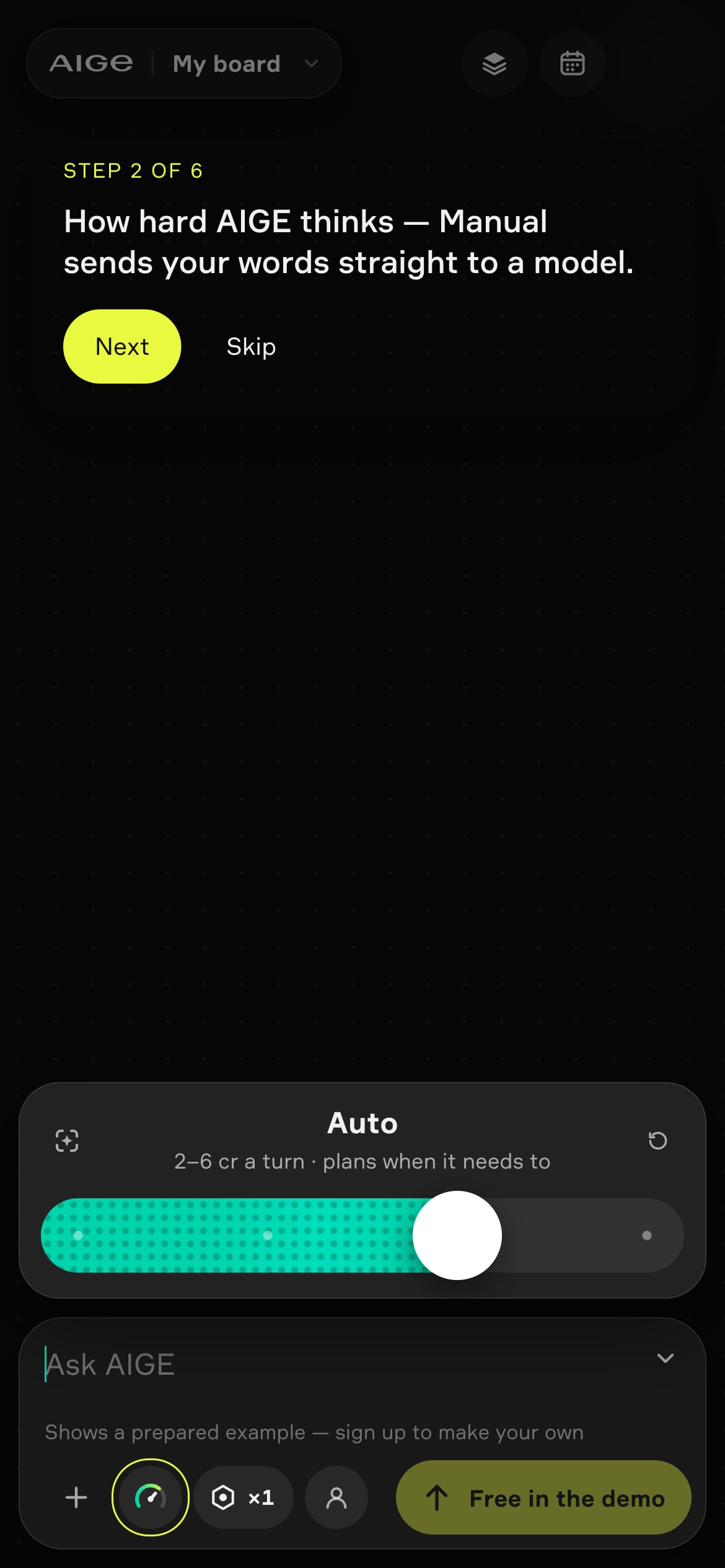
"Shows a prepared example — sign up to make your own." Press Send there and nothing goes to a server: no generation request, no call, no database write. AIGE reserves a frame titled "Prepared example" and fills it with a picture it already has.
Your words do not choose the picture. The picture is one of three prepared ones, picked for each visitor, and the clip is one of three prepared clips. At the Send step the guide fills the prompt box with the prepared example's own prompt. Type something else, press Send, and you still get a prepared picture.
Nothing that spends is offered. The demo's menus drop every action that costs credits, because the demo cannot make anything.
The dial shows real prices and charges none. In the screenshot the Auto stop reads "2–6 cr a turn · plans when it needs to". Those are the turn prices on a real board. Manual, the first stop, sends your words straight to the model and costs only the model's price.
What you do there lasts a day. The demo board is kept in your browser for 24 hours. Sign up inside that window and the finished prepared pieces move onto your own board. An idea you typed on the landing page fills the prompt box and is never sent.
What an account and a plan change
Creating the account costs nothing: you use Google or email and confirm you are 18 or older. Here is what each state can do.
Where you are | What you can do | What stops you |
|---|---|---|
Signed out | Open the demo board, follow the guide, press Send for a prepared picture and a prepared clip. | Nothing you type becomes a picture, and the board is kept for 24 hours. |
Signed in, no plan | Draft a creation and see what a run would cost. The FAQ lists drafting and seeing the cost as free. | A new account starts with 0 credits and has no daily credits. The pricing page reads "Plan only — no generation credits" for this state. |
On a plan | Make your own images and clips. Starter, at $8.55 a month, lists the full image studio with 2K output and short-form video of 3 to 5 seconds on selected models. | Each run spends credits, and its cost shows before you run it. |
On a real board, when your balance is below the price of a run, the send button says "Top up" instead of showing the price. For an account with no plan, that opens the list of plans. Credit packs are not a way in: they top up a plan you already have.
What a first image costs
Every generation shows its credit cost before it runs. Images start at 1 credit on GPT Image 2's low setting, and a 1K Nano Banana 2 image costs 8 credits. Manual charges only that model price; the other dial stops also charge a turn price for the agent, like the 2–6 cr line above. A plan is from $8.55 a month. Within 14 days of a payment you can get back the money for the credits you have not used; the FAQ on whether AIGE is really free has the terms and a worked example.
The pricing page lists every plan, and the AI image generator page lists the models and what each image costs.
If you need to make something right now with no account at all, AIGE is the wrong tool. One site whose own page titles say no sign-up is Perchance, as of October 2026. Our Perchance explainer says what we could and could not check.
Honest note: the demo is described from the screens above and AIGE's own code. The signed-in states come from the code, the FAQ and the pricing page as of October 2026, and nobody signed in a test account for this article. What a new account starts with is a live setting, not a constant in the app, so if the FAQ or the pricing page ever shows something other than 0 credits, trust the page. And AIGE sells the plans, so weigh that.
Quick answers
Question | Answer |
|---|---|
Can I use an AI image generator without signing up? | On AIGE you can try the demo board with no account, but it only shows a prepared picture and clip. Making your own images needs an account and a paid plan. |
Is there a free AI image generator on AIGE? | No. Creating an account costs nothing, but making images needs credits from a paid plan, from $8.55 a month. A new account starts with 0 credits. |
What does "Free in the demo" mean on the send button? | Nothing is charged because nothing is made. Send in the demo shows a prepared example, not a picture from your words. |
Is there an AI video generator without sign-up? | The same rules apply. The demo shows one prepared clip. Your own clips need a plan, and Starter lists short-form video of 3 to 5 seconds on selected models. |
How much does one image cost? | From 1 credit on GPT Image 2's low setting, and 8 credits for a 1K Nano Banana 2 image. The cost shows before you run it. |
What do I need to sign up? | A Google or email account, and you confirm you are 18 or older. |
Does the demo keep my board? | Your browser keeps it for 24 hours. If you sign up in that window, the finished prepared pieces move to your own board. |




Comments
Be the first to comment.