No. Nano Banana makes still pictures, not video. To get a video, make the still in AIGE with a Nano tile, then open the Canvas video editor, choose From a picture and let a video model such as Kling V3 animate it.
Why Nano Banana stops at the picture
Google's image-generation guide for developers, read on 28 October 2026, says Nano Banana is the name for Gemini's native image generation. Its closing advice is to use it for image generation and editing, and it sends video questions to a separate guide. A video can go in as a reference: one feature turns a clip into a new still, such as a poster. That runs one way, video in and picture out.
Google's page for video generation points to a different model, Gemini Omni Flash, and describes it as turning text prompts and images into short videos. AIGE's video list has an entry called Omni Flash, which is Google's Gemini Omni Flash 1.1.
So a Nano Banana video takes two models in a row. A Nano Banana model makes the still and a video model moves it. For what the models are called and how the names line up with Gemini, see Is Nano Banana the same as Gemini. For what the three Nano tiles in AIGE are for, see what is Nano Banana.
The route in AIGE: a still, then a video model
The Video widget and its editor are on the laptop canvas. The route has two parts, and only the first is specific to Nano Banana.
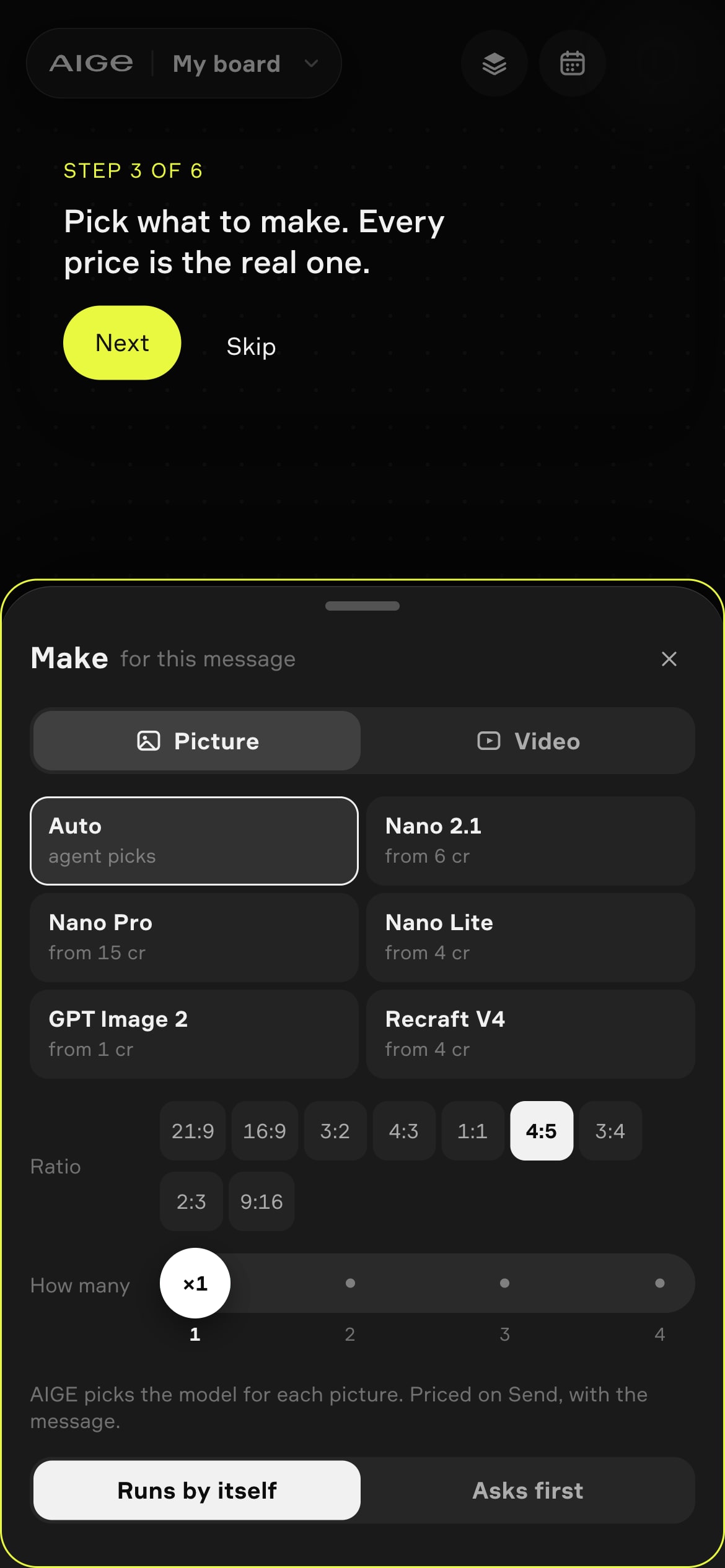
Make the still. In the Canvas chat composer, open the Make sheet from the generation settings button and pin Nano 2.1, Nano Pro or Nano Lite. Set Ratio to the shape you want the video in, 9:16 for vertical or 16:9 for wide, and send. The picture lands on your board.
Animate it. Add a Video widget from the Make menu, press Open editor, choose the Make tab and then From a picture, pick your still under Start picture, and follow turn a photo into a video with AI for the rest, which is the same for any picture.
Make the still in the shape you want the video. On Kling V3, Seedance 2.5 and H3 Max the clip takes its shape from the start picture, so a 9:16 still gives a vertical clip. A clip whose shape differs from the timeline's is cropped to fill the frame unless you set it to Fit. What is an aspect ratio explains the shapes.
What the video models take from a picture
The Model field starts on Kling V3 at 5 seconds, and the list has more beside it: Kling 3 Turbo, Kling o3 and Seedance among them. Here are four side by side. Each takes a start picture and an optional end picture for the clip to finish on, and each has its own shape rule and its own range of lengths:
Model | Shape of the clip | Clip length |
|---|---|---|
Kling V3 | Follows the start picture | 3 to 15 seconds |
Seedance 2.5 | Follows the start picture | 4 to 30 seconds |
H3 Max | Follows the start picture | 5 to 15 seconds |
Omni Flash | 16:9 or 9:16 | 3 to 10 seconds |
A single clip runs 3 to 30 seconds, depending on the model, and a longer video is several clips cut together on the timeline. The editor's Extend tool makes the next clip from a clip's last frame. Every model's range, and the reason each one stops where it does, is in how long an AI video can be. The price of a clip for each model sits in the table on AI video for YouTube, so this page does not copy it. Kling image to video, step by step covers the three Kling versions in the list.
A caution on end pictures: Kling 3 Turbo, one of the other models in the list, sends only the start picture, so an end picture is not used with it. Choose another model before you add one.
A worked example: one still, one 5-second clip
Here is a vertical clip from one picture, with the settings that set the price named. The prices come from AIGE's default credit table, and the button in the studio prints the real one before you press it.
Step | Settings | Credits |
|---|---|---|
1. The still | Make sheet, Picture tab: Nano 2.1 tile, Size 1K, Ratio 9:16, How many 1, composer on Manual | 8 credits |
2. The clip | Video editor, Make tab, From a picture: your still as the Start picture, Model Kling V3, Length 5 s | 63 credits |
Total | One 5-second vertical clip from one picture | 71 credits |
Manual sends your words straight to the model with no agent turn, so Send shows the picture's price alone. With the agent on, Send reads "from" and adds the agent's turn fee, which starts at 2 credits a turn. The video editor's Make tab has no switch for quality or sound: Kling V3 is asked for at Standard with sound on, and the 63 credits include the sound even if you mute the clip afterwards. Pick another model or length and the button changes its number as you go.
Plan reach differs. In AIGE's default plan table, which can change, Starter can make the 1K Nano 2.1 picture and a Kling V3 clip up to 5 seconds, so this exact example fits it. A 6-second Kling V3 clip does not, and H3 Max and Seedance 2.5 are not on Starter at all. When your plan cannot make a clip, the button names the plan that can. What a credit costs in dollars depends on your plan, so see pricing.
Honest note: This page shows no sample clips, so it cannot tell you how a particular still will move. You choose the model, the length and a sentence, and the model decides the motion. The prices and plan reach above are AIGE's defaults as read on 28 October 2026 and can change, and the Google details are as of the same date.
Quick answers
Question | Answer |
|---|---|
Can Nano Banana make videos? | No. It makes and edits pictures, and Google's own page points developers to it for image generation and editing. In AIGE you make the still with a Nano tile and animate it with a video model. |
Can Nano Banana create videos from a photo? | Not on its own. Pick the photo as the Start picture in the video editor's From a picture mode, or upload it there, and a video model such as Kling V3 animates it. |
What do I use instead of Nano Banana to make a video? | A video model. AIGE's list includes Kling V3, Seedance 2.5, H3 Max and Omni Flash, which is Google's Gemini Omni Flash 1.1. |
How do I turn a Nano Banana picture into a video in AIGE? | On the laptop canvas, add a Video widget from the Make menu, open the editor, choose Make, then From a picture. Pick your still as the Start picture, choose a model and a length, and press Make the clip. |
Can I start from my own photo? | Yes. The Start picture list shows the pictures on your board, and Upload adds a photo from your computer. |
How long can a video made from a picture be? | One clip runs 3 to 30 seconds depending on the model: Kling V3 3 to 15, Seedance 2.5 4 to 30, H3 Max 5 to 15 and Omni Flash 3 to 10. Cut clips together for anything longer. |
What does a Nano Banana picture plus a video clip cost in AIGE? | A 1K Nano 2.1 picture is 8 credits and a 5-second Kling V3 clip at Standard with sound on is 63 credits, so 71 credits for the pair. The button shows the real price before you press it. |





Comments
Be the first to comment.